Shreyansh Kotak's portfolio

About Me

I am a strategic Product Designer with a background in development, bringing a unique perspective that bridges design and engineering. Over 7+ years, I have launched products and led cross-functional teams to drive measurable engagement and revenue outcomes through data-informed design.

What sets me apart

  • Bridging design and development

    I bring a unique perspective to my work, combining my design skills with my understanding of development. This allows me to create not only visually appealing designs but also functional and scalable products.

  • Designing for complexity and scale

    I excel in complex design projects, where multiple factors and constraints need to be considered. I know how to break down complex problems into manageable parts and design elegant solutions.

  • Multi-sided systems and platforms

    I have extensive experience in designing for multi-sided ecosystems and platforms, where multiple user groups interact with each other and the product. My ability to understand the complexities of these systems and design products sets me apart.

Work Experience

  • Perpetual logo

    Product Design Manager

    Perpetual

    Oct 2026 - Present

  • Perpetual logo

    Lead UI/UX Designer

    Perpetual

    Jan 2023 - Sep 2026

  • Perpetual logo

    UI/UX Designer

    Perpetual

    Jan 2022 - Dec 2022

  • Perpetual logo

    Associate UI/UX Designer

    Perpetual

    Jun 2020 - Dec 2021

  • W. R. Berkley Innovation Labs logo

    Designer & Accessibility Engineer

    W. R. Berkley Innovation Labs

    Feb 2019 - May 2020 (Part Time)

  • Orion Racing India logo

    Web Developer

    Orion Racing India

    Feb 2016 - Jun 2018 (Part Time)

  • Home Robotics logo

    UX Designer

    Home Robotics

    Jan 2016 - Dec 2017 (Part Time)

Degrees

  • New York University logo

    M.S. Integrated Digital Media

    New York University • 2018 - 2020

  • Mumbai University logo

    B.Tech. Computer Engineering

    Mumbai University • 2014 - 2018

Certificates

Case Studies

Case studies locked

A selection of client work covering product strategy, research, interaction design, and delivery. Enter the password to view the full case studies.

What you'll find

  • End-to-end product design process
  • Project outcomes and the thinking behind key decisions

Creative Apps

Wicked CMS
Wicked CMS

A mobile companion for Webflow CMS. Edit, publish, and manage collection items from any device without opening the Webflow Designer.

Visit Wicked CMS

Impact

  • Used across 1,000+ sites
Wicked Assets for Webflow

Overcome Webflow's 4MB upload limit. Seamlessly resize, convert to various formats, and compress large images right in the Designer.

View app

Impact

  • 30,000+ assets optimized
Wicked Components for Webflow

Supercharge your workflow with a library of advanced, production-ready Webflow components to add to your site in minutes.

View app

Impact

  • 300,000+ monthly hits
Claude Code Usage
Claude Code Usage

A macOS menu bar app that shows how much of your 5-hour and weekly Claude Code limits you have left. It also totals tokens by model, day, and project from your local transcripts.

View on GitHub
Wicked Webflow MCP Manager

Keep a separate Webflow MCP connection authorized for every client at once, and load only the ones each project needs. Ships as a macOS app, a Claude Code plugin, and a CLI.

View on GitHub

Thought Leadership

Playground

Pixel Art Chess
Pixel Art Chess

A full set of chess pieces in a retro pixel art style. Flat backs make them easy to mount in a shadow box as wall art, or to display on a desk.

View model
Mini Dino Buddy
Mini Dino Buddy

Bring a touch of prehistoric fun to your desk or shelf with this adorable, chunky green dinosaur! This 3D model is designed for simplicity and charm.

View model
Minimalist Reindeer
Minimalist Reindeer

Bring a touch of minimalist charm to your home with this sleek and modern reindeer figurine! Perfect for holiday decor, or desk ornamentation.

View model
Code mode for Webflow MCP thumbnail

Code mode for Webflow MCP

Webflow's MCP made a lot of my day-to-day work easier in Claude Code.

However, sometimes it gets bloated when the question covers the whole site. For example, find every CMS item that references another item with a certain value. Or, add a link to the top of every page. Claude works through these one tool call at a time, and every response lands in the conversation, including all the fields it doesn't need. The conversation fills up getting to the answer.

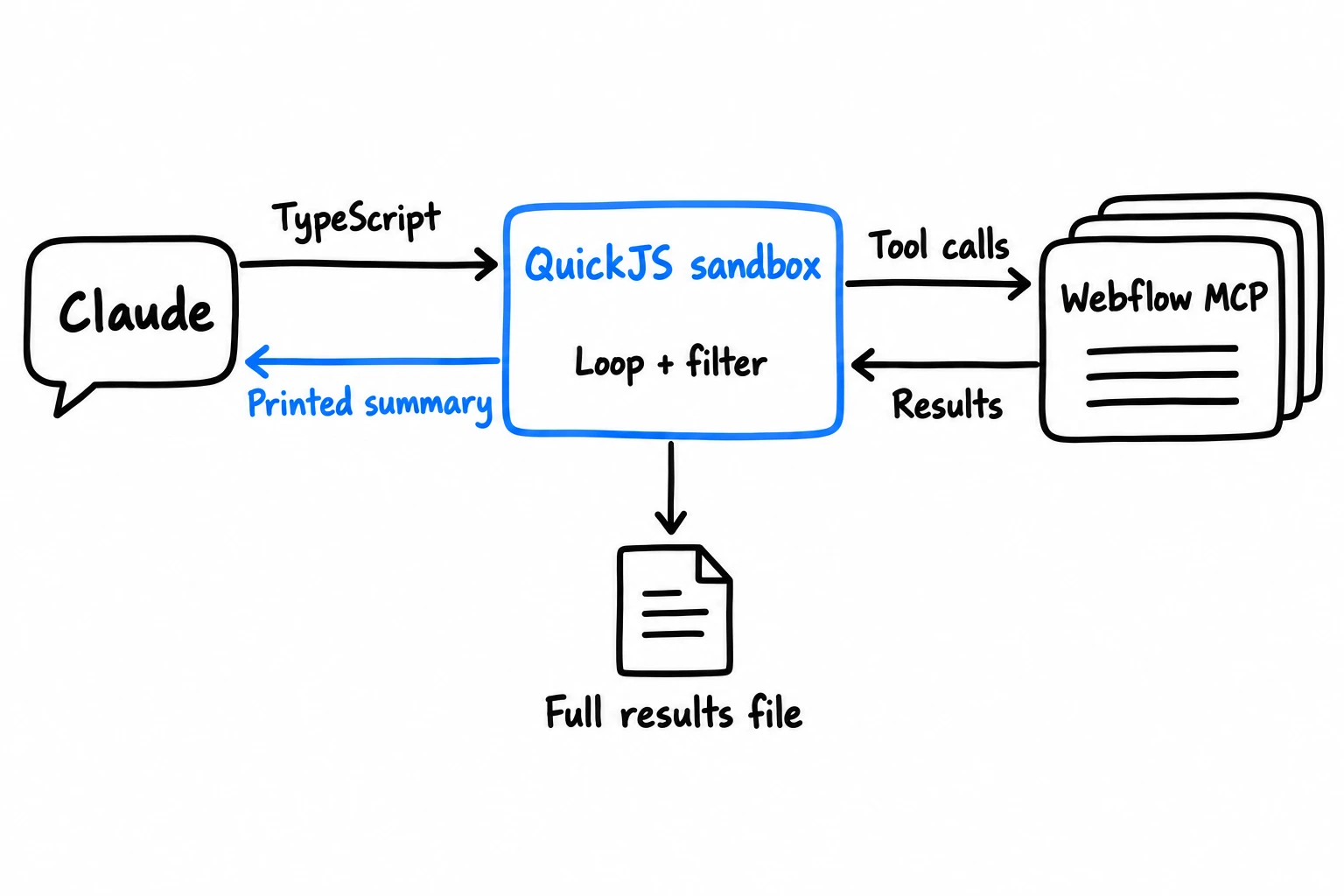
So I built webflow-codemode, an open source Claude Code plugin. Claude writes a short TypeScript code snippet, and a sandboxed executes the code against the Webflow MCP. The code does the looping and filtering. Claude only sees what the code outputs.

Same tasks, with and without code mode

I asked Claude the same question about a client site, once with direct MCP tool calls and another with code mode.

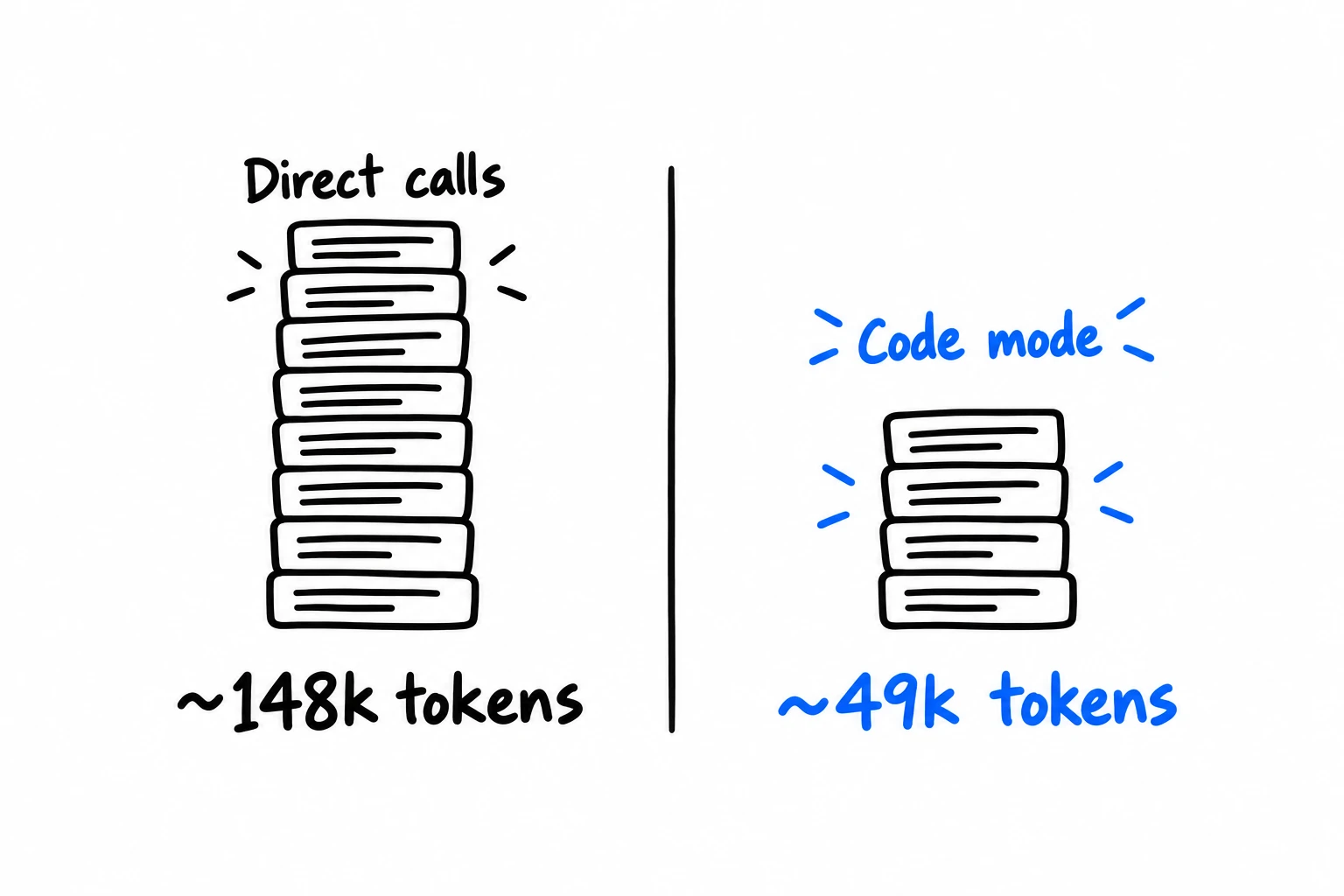
  • About 49,000 tokens of context with code mode, against 148,000 with direct tool calls.
  • 65 seconds with code mode, against 76.
  • The same ~200 courses in both. Code mode also checked a second collection of course pages and found ~140 more.

The test

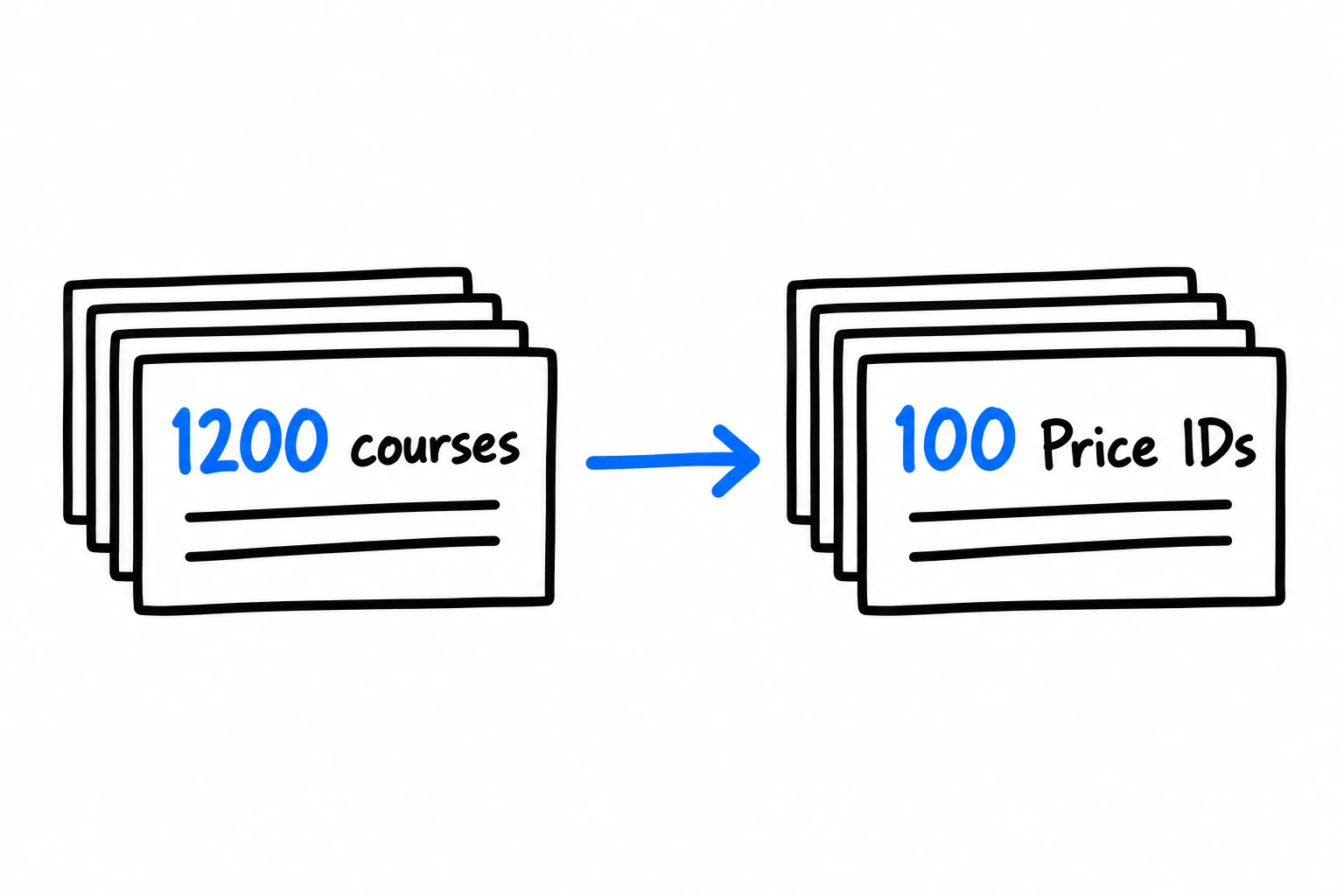
The site has two CMS collections that matter here. Courses has over 1,200 items. Price IDs has about 100, and each one has a price category. Every course links to one Price ID through a reference field.

The question was simple. Which courses use a Price ID in a particular price category?

Webflow can't answer that in one request. A filter on a reference field takes item IDs, so you first find the Price IDs in that category, then find the courses that link to them.

Two CMS collections, labeled 1200 courses and 100 Price IDs, with an arrow from courses to the Price IDs they reference.
Each course references one Price ID. Collection sizes are approximate.

Both runs used the same model and started under 30,000 tokens, which is Claude Code's own setup before any Webflow work.

Direct tool calls

Claude searched for Webflow tools and loaded 14 tool definitions. That took the context from about 28,000 tokens to 114,000 before Claude had read anything from the site. The collection list, the Courses and Price IDs schemas and the matching Price IDs added more.

Claude found 13 Price IDs in the category. Then it did something smart and filtered the reference field to request only the courses linked to those 13. It got 195 back in two pages of results, 1.46 million characters in all. Every course came back with all of its fields, including two rich text bodies, when the answer needed a name and an ID. Claude Code doesn't put a response that large into the conversation, so it saved it to a file, and Claude wrote jq commands to pull the names and IDs out.

So the direct run ended up using code to process the data anyway, just as a workaround.

Code mode

Claude read the plugin's instructions, found the CMS tool in the generated type index and ran two bundled example snippets to find the site and list its collections. Then it wrote two of its own. The first printed the fields of Courses, Price IDs and one more collection. The second read every item in all three, matched each course to its Price ID in code, printed a summary and saved the full list to a file.

The largest thing to enter the conversation was that field list, at about 6,000 tokens. The nearly 1,700 items the snippet read never did.

The field list is also where Claude spotted the third collection, a newer set of course pages that links to Price IDs too. That's where the 134 extra matches came from. It was one run each, and Claude could have checked that collection either way. Still, looking at one more collection costs very little when the data stays in the sandbox.

What the numbers say

On a question this small, 11 seconds isn't much of a difference. The context is where it shows. Direct calls added about 121,000 tokens to the conversation. Code mode added about 20,000.

A tall stack for direct calls at about 148,000 tokens of conversation context, beside a shorter stack for code mode at about 49,000 tokens.
Final context size for each run. Both started under 30,000 tokens. One run per method, and code mode also checked a second collection.

That gap compounds. Claude re-reads the whole conversation on every turn, so over the full run it processed about 1.57 million input tokens with direct calls and 395,000 with code mode. Most of those were cached reads. A fuller context still leaves less room for the rest of your session before Claude Code has to compact it.

Code mode did make more requests to Webflow, 66 reads against the direct run's 10, because it read every item instead of filtering. On a site this size, the runner's throttling and retries absorbed that.


A full circle moment

There's something a little funny about all this.

An API is deterministic. You write a request and get the same response every time. MCP put a model in front of the API. You describe what you want in plain language, and the model decides which tools to call, in what order and with what inputs. That's what made Webflow's MCP so easy to pick up. It's also why two runs of the same prompt can take different paths, like the collection one run checked and the other skipped.

Code mode swings it back. The model still makes the judgment calls, like which collections and fields matter. The script applies the same rule to every item and returns the same result each time you run it. You can open it and read the rule. My test run even left behind a script I can rerun with a different value.

So we put a model in front of the API to make it easier to use, and now we ask that model to write code to make it predictable again. I don't see that as a step backwards.


Why not just use the API?

If the end result is code calling Webflow, Claude could write a script against Webflow's Data API and skip the MCP entirely. For CMS work, that's a reasonable option. I kept the MCP for three reasons.

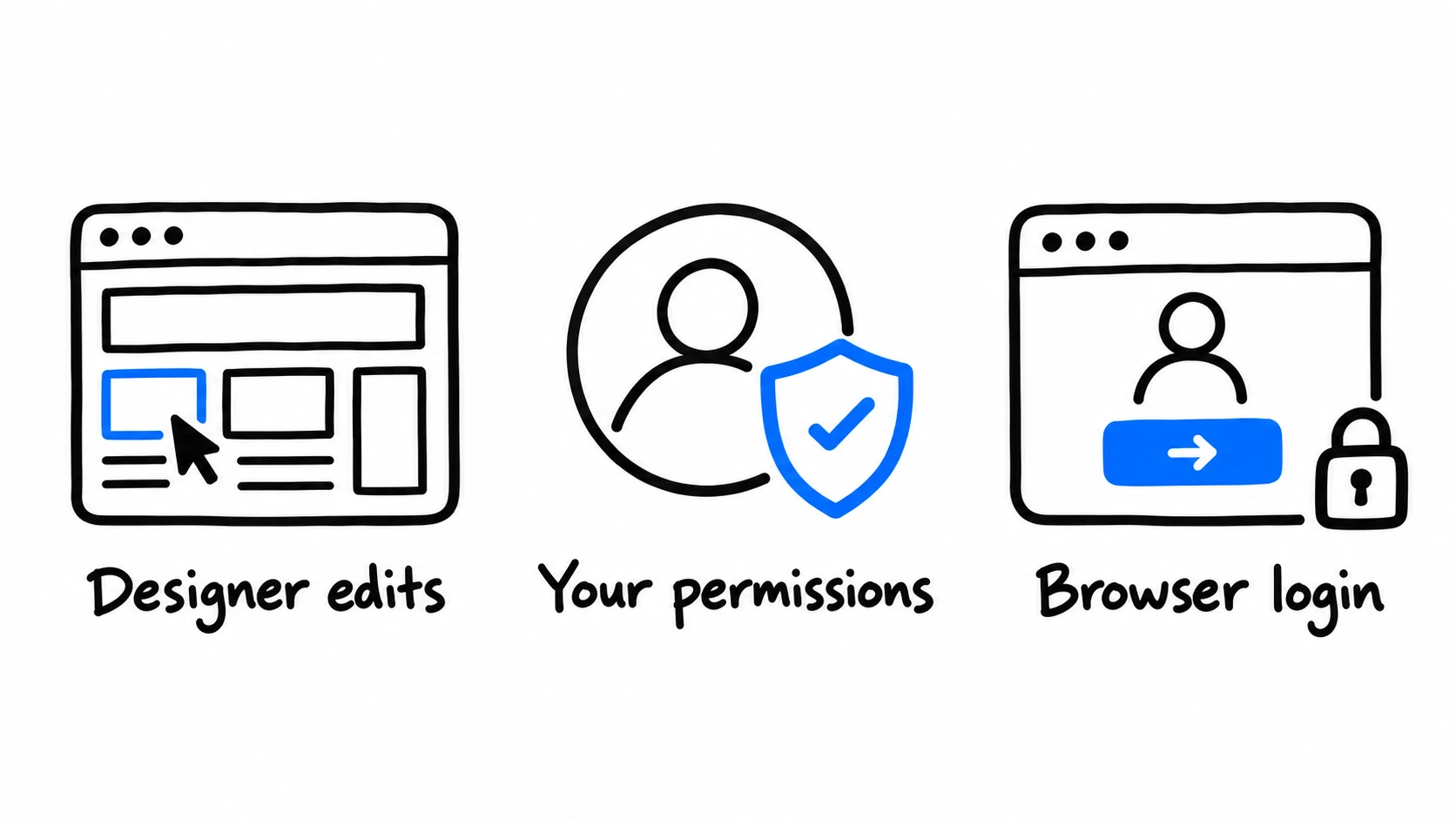
Three reasons to keep Webflow MCP: editing in the Designer, access tied to your permissions and logging in through the browser instead of handling an API key.
What the MCP gives you that an API key doesn't: Designer edits, your own permissions and no key to handle.

The first is the Designer. Webflow's MCP can add elements, edit styles and work with components, and most of that isn't in the Data API. With code mode, Claude can loop over pages in the Designer the same way it loops over CMS items.

Adding a "Skip to main content" link to every page is a good example. It's the same small edit on each page, so a snippet loops through the pages and adds the link as the first element on each one.

The second reason is access. An API token isn't tied to a person. Whoever holds it gets its scopes, whatever their role in the workspace. The MCP login goes through Webflow's OAuth as you, so Claude gets your permissions and nothing more, limited to the workspace and sites you pick on the consent page. On Enterprise, if your role only lets you edit two CMS collections, Claude can only edit those two too. I didn't want to give that up by handing Claude an API key.

The plugin adds its own checks on top. Reads run without asking. Creates and updates open a system dialog first, with Deny as the default, and you can choose to always allow an action on a site. Deletes and publishes ask on every run.

The third reason is key handling. An API key is a password to the site. Developers usually know to keep it out of chats and code, store it encrypted and rotate it when someone leaves. Plenty of people working on Webflow sites with Claude don't, and the easy mistake is pasting the key into the conversation or a plain text file. With the MCP there's no key to handle. You log in through Webflow in the browser, and the plugin keeps the login in the macOS Keychain.


How it works

Cloudflare described this pattern as Code Mode. Anthropic's post on code execution with MCP names the two costs it avoids, tool definitions and intermediate results, and the direct run paid both. This plugin applies it to Webflow.

When you log in, the plugin turns Webflow's MCP tool definitions into TypeScript types and a short index. Claude reads the index, opens only the types it needs and writes a snippet that calls functions like webflow.data_cms_tool.list_collection_items(...). The full tool definitions stay out of the conversation, and that's where most of the direct run's context went.

The runner typechecks the snippet, then runs it in a QuickJS sandbox. The snippet can call Webflow tools and read and write files in its own output folder. It can't make other network requests or reach the rest of your files.

Only console.log output comes back to Claude, capped at 20,000 characters. Bigger results go to a file, and Claude gets the path. The runner sends up to four Webflow calls at a time and queues the rest. It retries reads that hit the rate limit. It doesn't retry writes, because a failed write may have partly gone through.

Claude sends TypeScript to a QuickJS sandbox. The script calls Webflow MCP, loops over and filters the results and saves the full results to a file. Only its printed summary goes back to Claude.
Webflow's responses stay in the sandbox. Claude only sees what the script prints, including the path to any saved file.

Typechecking catches a wrong argument. It won't catch a wrong rule. Claude can still pick the wrong field or match on the wrong value, so read the snippet when the answer matters. That's still easier than auditing a chain of tool calls.


When I'd use it

  • Finding items in one collection by a value on the items they reference.
  • Searching for a phrase across CMS items and pages.
  • Finding items with a missing field.
  • Making the same edit on every page, or on a batch of CMS items.
  • Exports and reports you'll want to run again.

For a single page or item, a direct MCP call is fine. Code mode helps once the work means paging through data, following references or repeating the same step.

Claude doesn't need to read the whole site to answer a question about it. It needs to write the code that does.


Try it

The plugin needs Claude Code, a Mac with Apple silicon and a Webflow account. The runner ships as a single binary, so there's nothing else to install. In Claude Code, run:

/plugin marketplace add wickedapps/webflow-mcp-codemode
/plugin install webflow-codemode@webflow-plugins

Restart Claude Code or run /reload-plugins, then type /webflow-codemode:setup. It walks you through the Webflow login and a first read on your site.

The source is on GitHub under the MIT license.